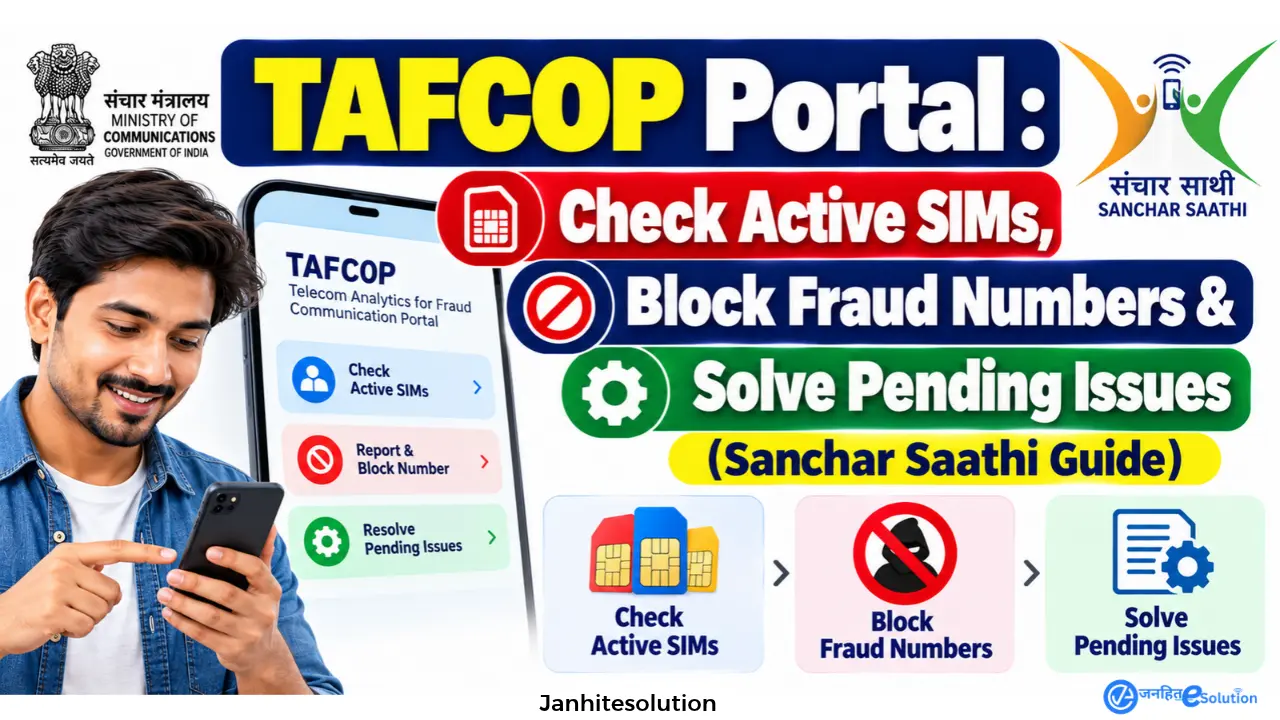
Are you completely sure that cybercriminals are not using your identity proof to run illegal mobile numbers? With the sharp increase in identity theft across India, checking your telecom footprint is no longer a choice—it is a necessity.
To help citizens track this, the Department of Telecommunications (DoT) launched the TAFCOP Portal, which is now officially integrated into the highly secure Sanchar Saathi platform.
In this comprehensive, ground-reality guide by Janhit E-Solution, we will not only show you how to check active SIMs, but we will also tackle the real problems users face—like what to do when your blocking request stays “Pending” for months, or how to unblock a number you reported by mistake.
Quick Information Overview & Helpful Links TAFCOP Portal
| Parameter | Important Details |
| Official Portal Link | sancharsaathi.gov.in (Do not use .com or fake apps) |
| Administering Authority | Department of Telecommunications (DoT) |
| Maximum SIM Limit | 9 SIMs globally / 6 SIMs for J&K and North-East residents |
| Grievance Portal | sancharsaathi.gov.in/grievance |
| DoT Official Helpline | 011-20907480 (Mon-Fri, 9:00 AM – 5:00 PM) |
| Cyber Fraud Helpline | 1930 (Call immediately if money is stolen) |
The Telecommunications Act 2026: Fines & Jail Terms
If you think having a few extra SIM cards lying around is harmless, the new Telecom Law 2026 proves otherwise. The government is strictly enforcing limits to curb digital financial fraud:
- Jail Punishment for Fake SIM Cards: Obtaining a SIM card using forged documents or someone else’s ID without permission is now a strict criminal offense. It carries a penalty of up to 3 years in prison, a fine of ₹50 Lakh, or both.
- Fine for Extra SIM Cards: If you legally possess more than the allowed 9 SIM cards (or 6 in specified zones), the DoT will issue a warning. Failure to re-verify or surrender the extra numbers results in a ₹50,000 fine for the first offense, reaching up to ₹2 Lakh for repeat violations.
Step-by-Step: How to check how many SIMs are on my Aadhaar card online?
Note: You do not need to enter your Aadhaar number. The portal securely maps all connections linked to the specific ID proof you originally submitted for your current mobile number.
1.Visit the Sanchar Saathi Portal:Avoid third-party apps.
Open your browser and go strictly to sancharsaathi.gov.in.
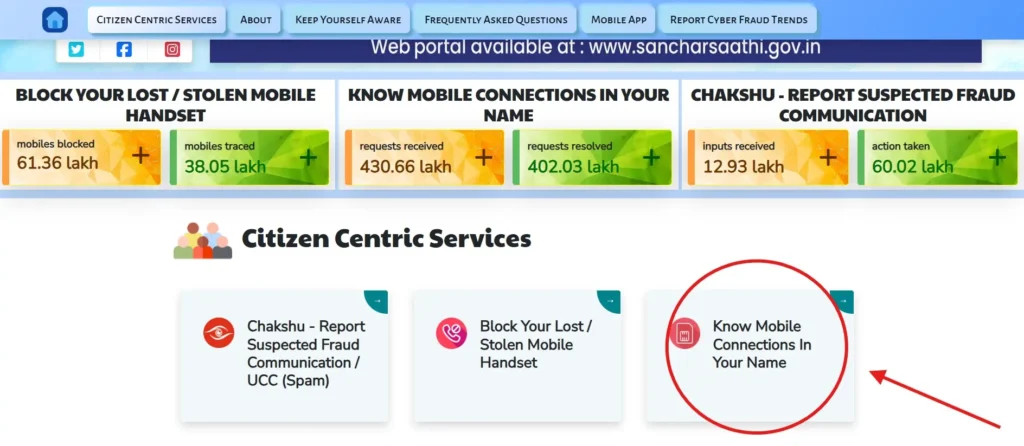
2.Navigate to TAFCOP:
Scroll down to ‘Citizen Centric Services’ and click the “Know Your Mobile Connections (TAFCOP)” block.
3.Enter Login Details:
Input your current 10-digit mobile number and carefully type the CAPTCHA code shown on the screen. Click “Validate Captcha”.
4.OTP Verification:
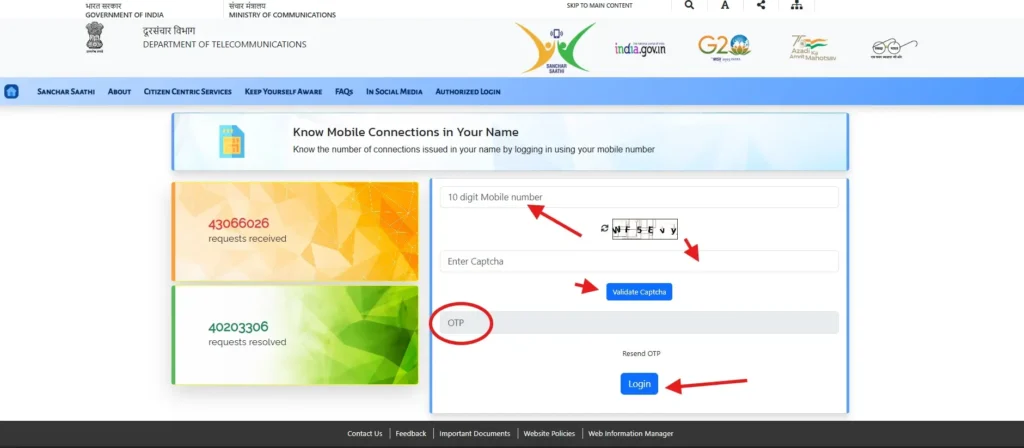
You will receive a 6-digit OTP via SMS. Enter it and hit “Login”.
5.Audit Your Connections:
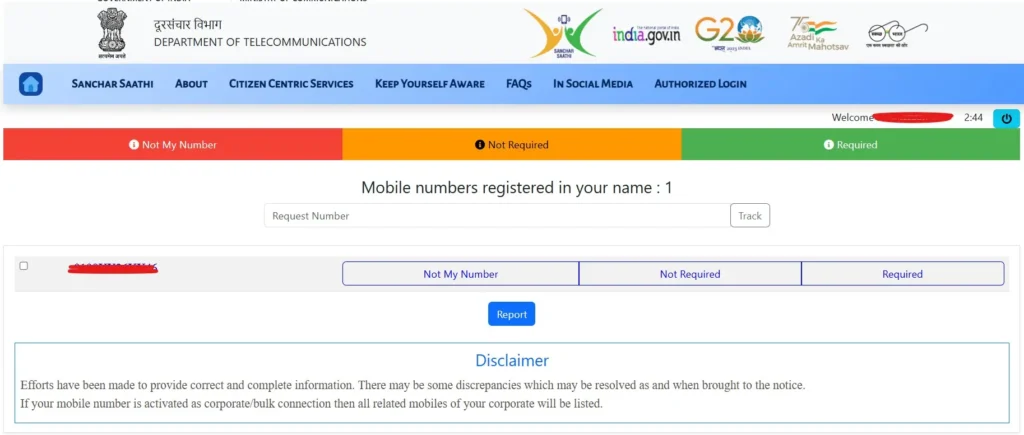
A dashboard will appear listing all mobile numbers active under your name. For privacy reasons, the middle digits are masked (e.g., 98XXXXXX21).
How to Block Unknown SIM Cards on TAFCOP Portal
If you spot a number you do not recognize, you must take immediate action to avoid legal liability.
- Select the Number: Check the small box on the left side of the suspicious number.
- Choose ‘Not My Number’: Below the number, select the “Not My Number” option. (Only select “Not Required” if the number is yours but you want it permanently closed).
- Submit Report: Click the “Report” button at the bottom of the page.
- Save Ticket ID: You will immediately receive a Request ID / Ticket Number on your screen and via SMS. Save this to track your complaint.
Real Ground Realities: Troubleshooting TAFCOP Issues
Many generic guides tell you how to click ‘Report’ and stop there. But what happens when things go wrong? Here are solutions to real problems faced by users on consumer forums and Reddit:
1. The “Status Pending for Months” Problem
The Issue: Many users complain that they reported a number as “Not My Number”, but months later, the status still shows “Pending” and the number is still active.
The Ground Reality: TAFCOP only routes your request to the respective Telecom Service Provider (Jio, Airtel, Vi, BSNL). Sometimes, telecom companies drag their feet to maintain their active subscriber base.
The Solution:
- Wait for the statutory SLA (Service Level Agreement) period: Operators must bar outgoing calls within 30 days and permanently disconnect within 60 days.
- If 60 days pass without action, go to the Sanchar Saathi Grievance Page and file an official complaint against the telecom operator for non-compliance.
2. “I accidentally reported my own active number!”
The Issue: Users sometimes mistakenly click “Not My Number” on their own SIM or a family member’s SIM, resulting in the network being unexpectedly barred.
The Solution: The DoT recently added a “Reconnect My Number” feature.
- Go to the Grievance section on Sanchar Saathi.
- Select Reconnect My Number.
- Crucial Rule: You can only request reconnection within 90 days of the disconnection, and this lifeline can only be used once per mobile number. Choose the reason: “I reported my number by mistake and could not revoke my request within time.”
3. “OTP Not Received” on the Portal
The Issue: The .gov.in servers face heavy traffic, causing OTP delivery failures.
The Solution: Clear your browser cache. Try logging in during non-peak hours (avoid 10 AM to 2 PM). Also, ensure your telecom operator hasn’t blocked transactional SMS via DND settings.
Context for Haryana & CSC VLE
For citizens utilizing the Parivar Pehchan Patra (Family ID) or the Saral Haryana portal, maintaining updated telecom records is non-negotiable. If your state pension or agricultural subsidy (like SMAM) is tied to a mobile number you no longer possess, your OTPs will fail at the CSC center.
Use TAFCOP to permanently close lost numbers, and visit your local CSC VLE to update your active number in your Aadhaar and Family ID immediately.
महत्वपूर्ण लिंक्स (Important Links & Helplines)
| सेवा का नाम (Services) | सीधा लिंक (Direct Link) |
| Sanchar Saathi (संचार साथी) Official Portal | Click Here |
| TAFCOP: अपने नाम पर चल रहे SIM चेक करें | Click Here |
| CEIR: चोरी या खोया हुआ मोबाइल ब्लॉक करें | Click Here |
| CHAKSHU (चक्षु): फ्रॉड कॉल्स/SMS की रिपोर्ट करें | Click Here |
| Grievance: गलती से ब्लॉक हुए नंबर को चालू करवाएं | Click Here |
| National Cyber Crime Portal (ऑनलाइन ठगी की रिपोर्ट) | Click Here |
| Cyber Fraud Emergency Helpline Number | 1930 (कॉल करें) |
| DoT Official Helpdesk | 011-20907480 |
Frequently Asked Questions (FAQs)
What does ‘Pending’ mean on the TAFCOP portal?
‘Pending’ means your request to block the SIM has been forwarded to the telecom operator (Jio, Airtel, BSNL, etc.), but their verification team has not yet completed the physical disconnection process in their backend systems.
Why is my family member’s number showing in my TAFCOP list?
Numbers are mapped by the ID proof used during purchase. If you used your Aadhaar or Voter ID years ago to buy a SIM card for your wife, child, or parent, it will legally show up under your TAFCOP dashboard.
How many days does it take to deactivate a SIM on TAFCOP?
Once reported, telecom operators generally follow a 60-day cycle: outgoing calls are barred within 30 days, incoming within 45 days, and complete deactivation happens by day 60.
Can I check someone else’s SIM details on TAFCOP using their Aadhaar?
No. TAFCOP prioritizes privacy. You cannot search using an Aadhaar number. You can only view the SIM cards linked to the exact ID proof that was used to purchase the active mobile number you use to log in via OTP.
Is TAFCOP portal real or fake?
It is 100% real and legally binding. It is an official tool managed by the Department of Telecommunications (DoT), Government of India, and hosted by C-DOT.